
Bank & payments

How to request a GoCardless payment

Collect an issued invoice through GoCardless when your organization and client mandate are connected.

1 min readUpdated 10.07.2026

GoCardless collection lets you request direct debit payment on issued invoices. See how to set up online payments and how to track payments and allocations.
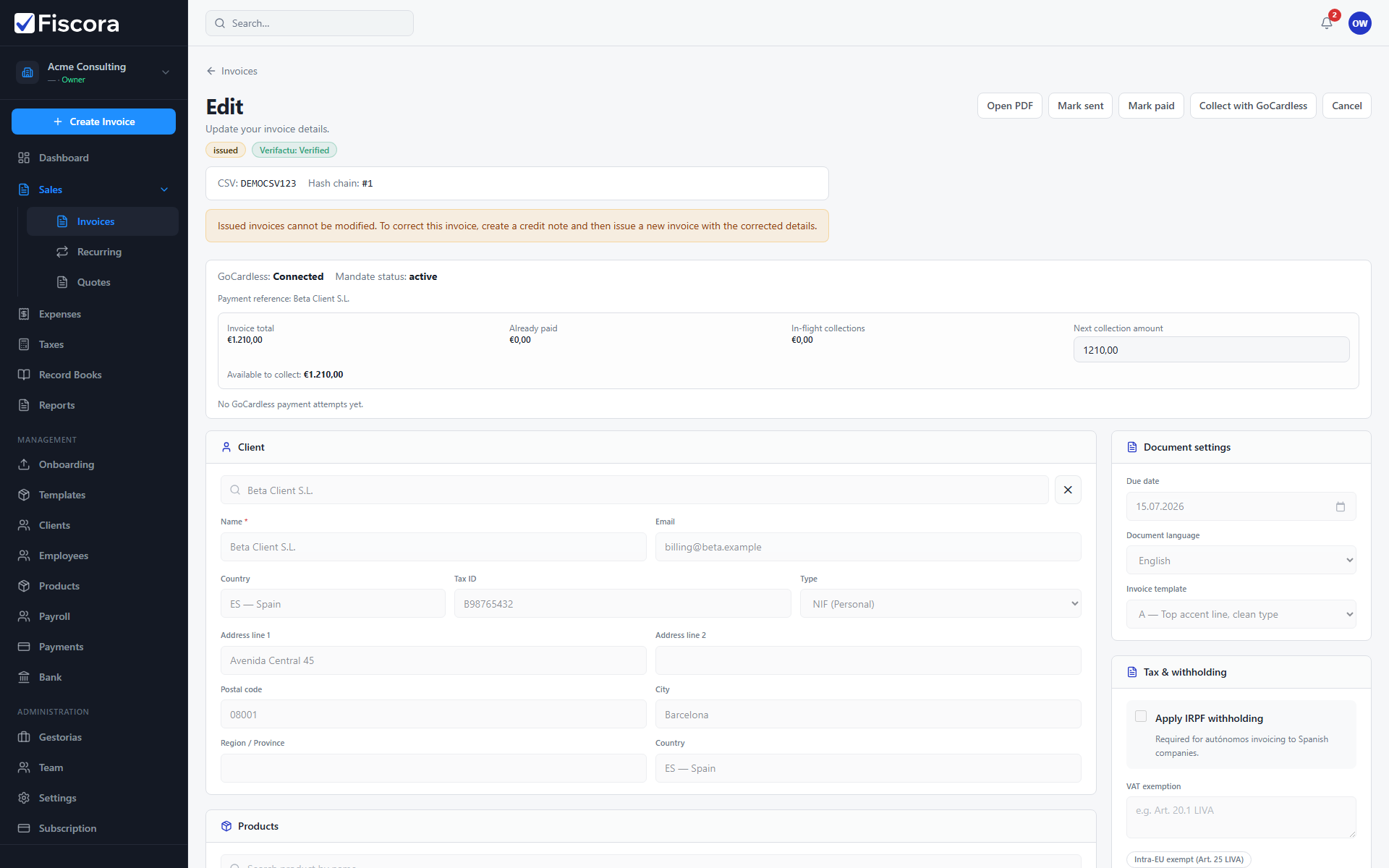
Issued invoice editor with Request GoCardless payment action visible.

Before requesting payment

  1. Connect GoCardless in SettingsPayment Methods.
  2. Ensure the client has an active mandate or can complete mandate setup.
  3. Open an issued or sent invoice with an outstanding balance.

Request payment

  1. Select Collect with GoCardless on the invoice.
  2. Review the amount and mandate status shown.
  3. Confirm the collection request.

Was this article helpful?

Still need help?

Share the context and we'll reply with practical guidance from support.

Open request

You may also find these useful

Bank & payments

How to set up online payments

Configure bank transfer details and connect GoCardless so customers can pay issued invoices online.

Read article
Bank & payments

How to configure bank transfer details

Set IBAN, BIC, and payment terms shown on invoices and used in default payment instructions.

Read article
Bank & payments

How to reconcile bank transactions

Import or sync bank movements and match them to invoices, expenses, or payroll payments.

Read article