
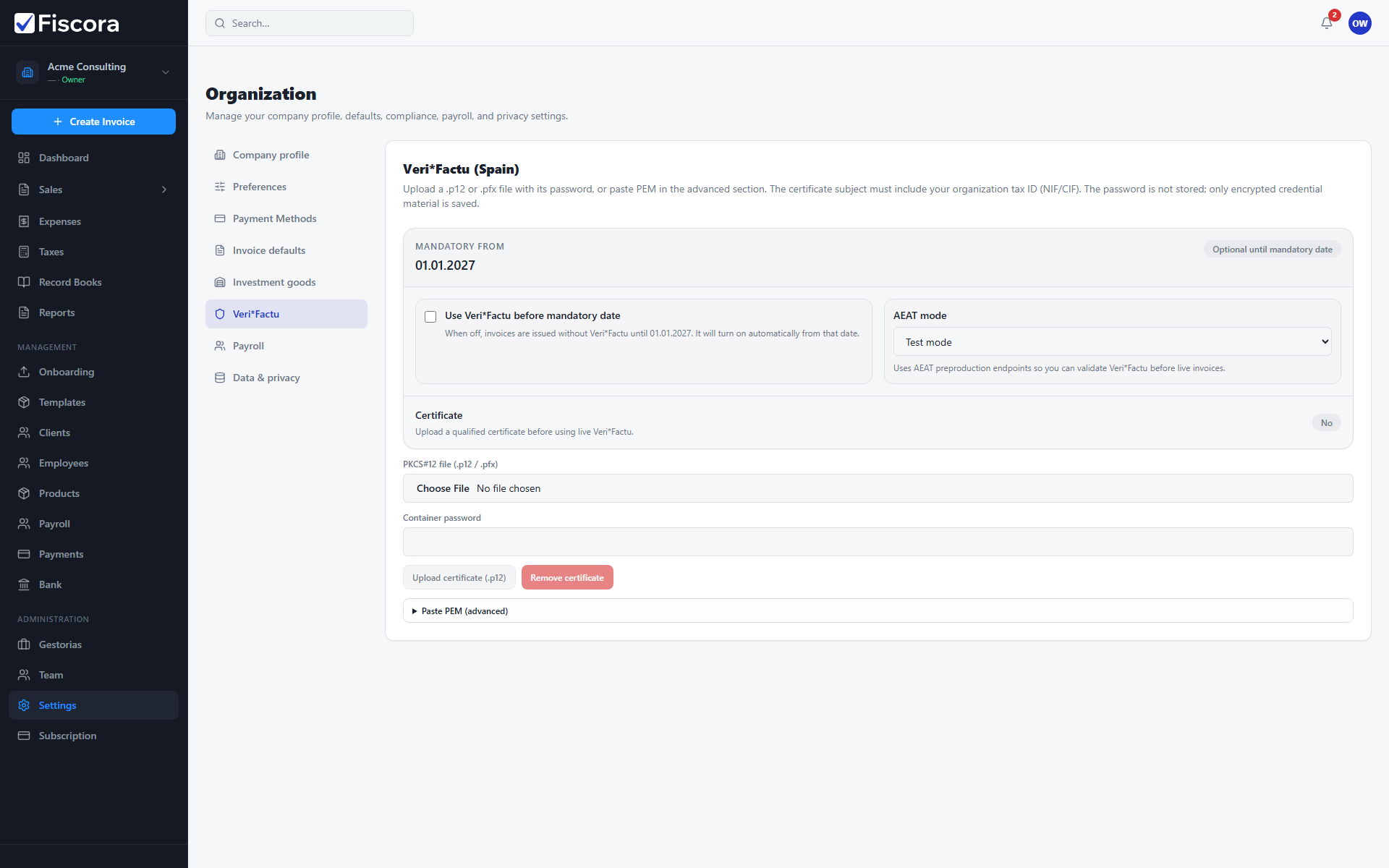
Live Veri*Factu requires a qualified electronic certificate issued to your organization NIF/CIF. After you obtain it, upload the .p12 file in Fiscora. See also how to configure Veri*Factu.
What certificate you need
- A qualified electronic certificate (certificado electrónico cualificado) valid in Spain.
- The certificate subject must include the same NIF/CIF as your Fiscora organization.
- Export format PKCS#12 (.p12 or .pfx) with a container password you know.
Where to obtain it
- Autónomos / natural persons: request a certificate from FNMT-RCM (certificados.sede.fnmt.gob.es) or another qualified provider.
- Companies (SL, SA, etc.): use your provider's legal representative or company certificate flow (FNMT, Camerfirma, ANF, or similar).
- Complete identity verification (in person, video, or provider-specific process) before download.
Export for Fiscora
- Download or export the certificate as a .p12 or .pfx file.
- Set a container password during export — you will enter it once when uploading to Fiscora.
- Store the file securely and plan renewal before expiry (certificates typically last 1–2 years).
Next step in Fiscora
- Open Settings → Veri*Factu or finish the certificate step in Get started setup.
- Upload the certificate and confirm status shows valid.
- Switch AEAT mode to live only after the certificate is ready.