
Tax and financial preferences live in organization settings alongside invoice defaults. They control VAT presets, IRPF withholding, and investment goods — see how to use tax reports for filing.
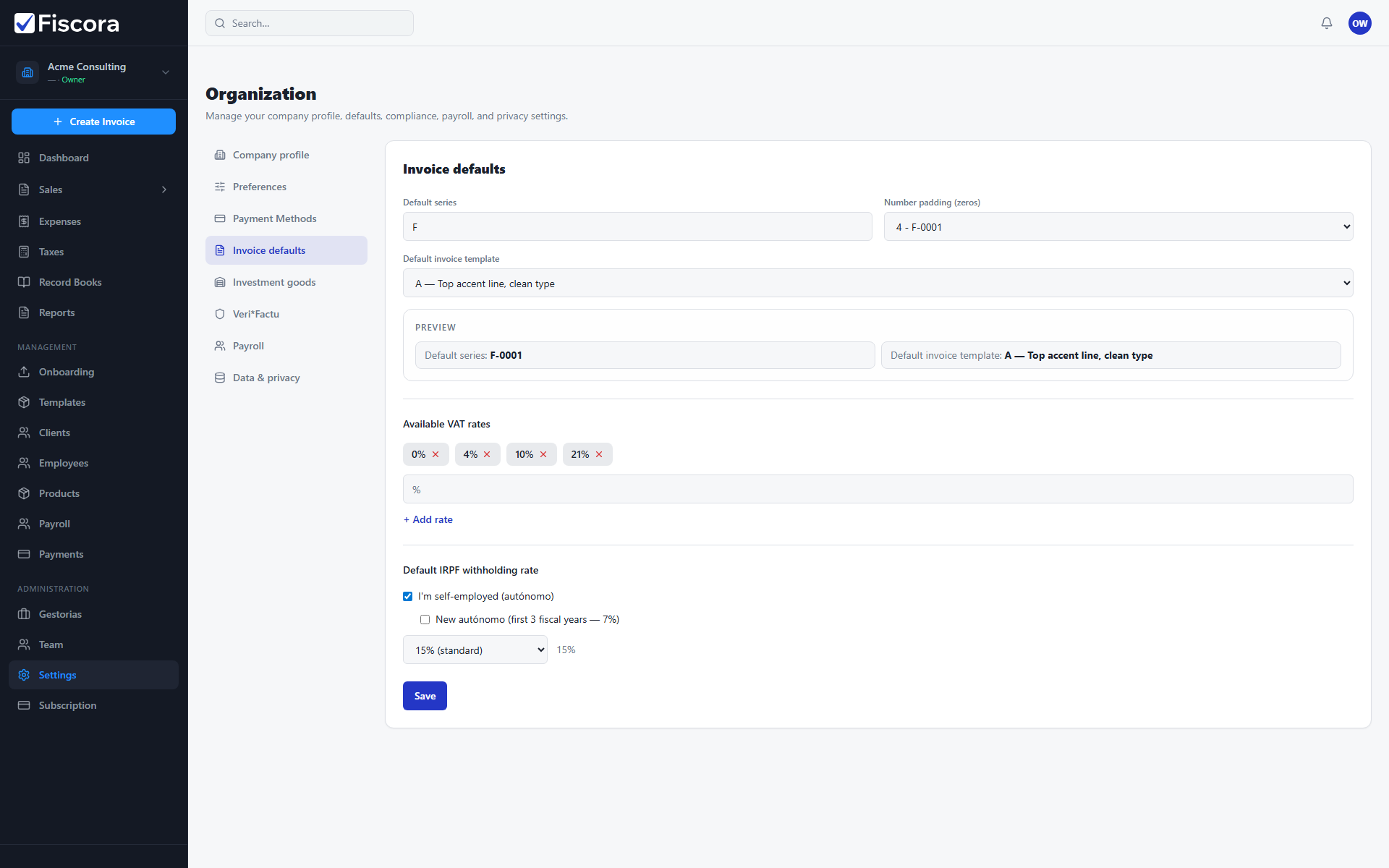
Open invoice defaults
- Select Settings in the left navigation.
- Open the Invoice defaults section.
- Scroll to the tax-related groups for VAT presets and IRPF withholding.
Configure VAT presets
- Review the Available VAT rates chips already listed for your organization.
- Remove a rate you no longer use, or add a new percentage when your business needs another VAT option.
- Saved presets appear as quick choices when you add lines to invoices.
Set default IRPF withholding
- Enable I'm self-employed (autónomo) when IRPF withholding applies to your invoices.
- Choose the default IRPF rate that matches your usual withholding, such as 7% or 15%.
- Use a custom percentage only when your tax situation requires a different rate.
- Select Save to apply the changes.
Investment goods rules
- Open the Investment goods section in organization settings.
- Set the minimum amount that qualifies a purchase as an investment good.
- Define amortization rules with minimum amounts and years when you track depreciable assets.
- Save the section after updating thresholds or rules.