
Invoices

How to send an invoice reminder

Follow up with a customer when an invoice was already emailed but still needs payment or acknowledgment.

1 min readUpdated 10.07.2026

Reminders are available after Fiscora successfully sent the original invoice email. See how to send an invoice for the first send.
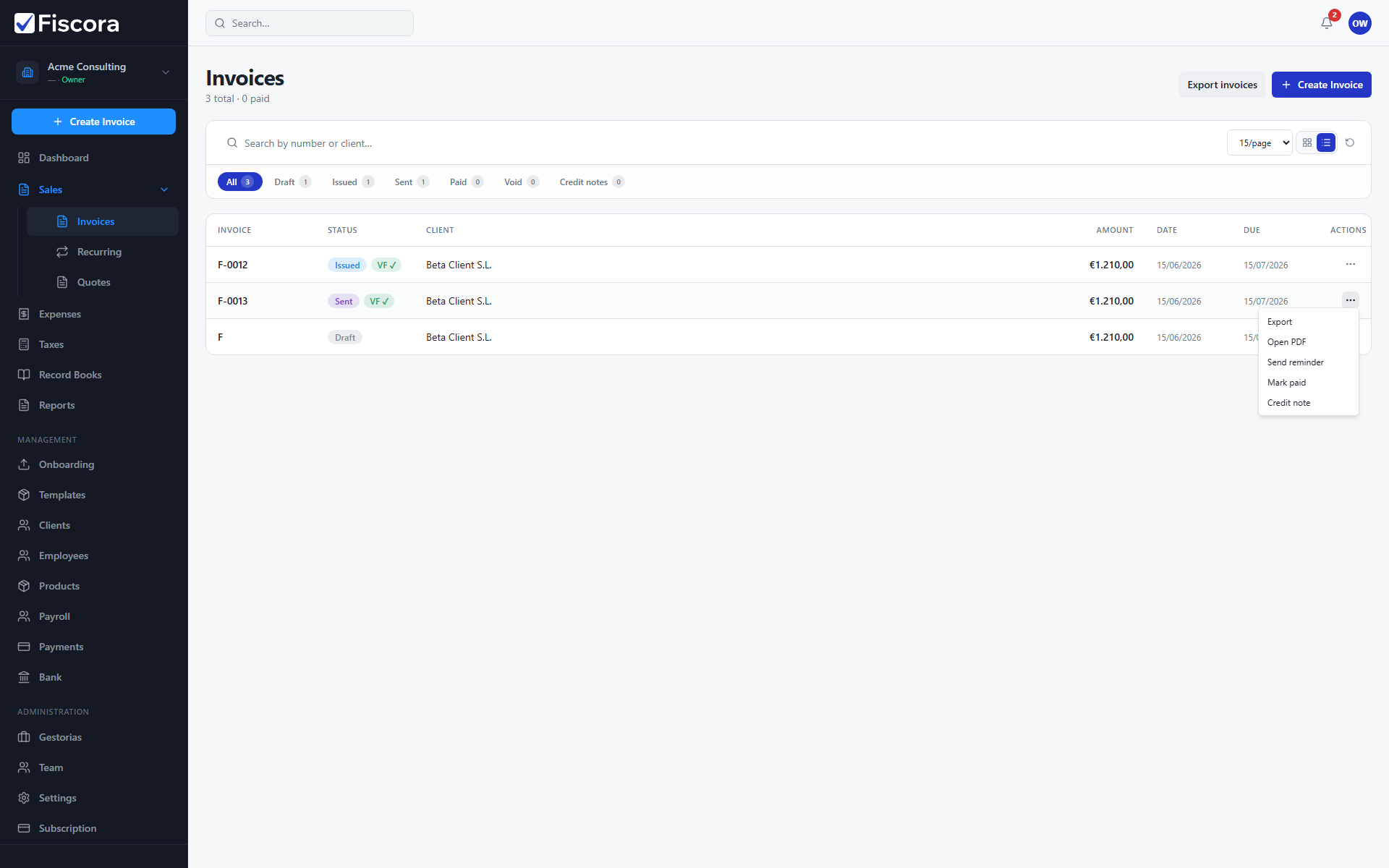
Invoices list with Send reminder action visible in the row actions menu.

When reminders appear

  1. The invoice must already be issued with a PDF.
  2. A successful send must be recorded for that invoice.
  3. The row action changes from Send by email to Send reminder.

Send the reminder

  1. Open SalesInvoices.
  2. Find the sent invoice.
  3. Open row actions and select Send reminder — then mark the invoice as paid when payment arrives.

Was this article helpful?

Still need help?

Share the context and we'll reply with practical guidance from support.

Open request

You may also find these useful

Invoices

How to view and manage invoices

Use the invoices list to search, filter by status, and open the invoice you need to review or follow up.

Read article
Invoices

How to create and edit an invoice

Start a new invoice from the invoices area, complete the client and line items, and save or issue it when you are ready.

Read article
Invoices

How to start a new invoice

Open the invoice editor, choose a client, add lines, and save a draft before issuing.

Read article